Join the waitlistJoin

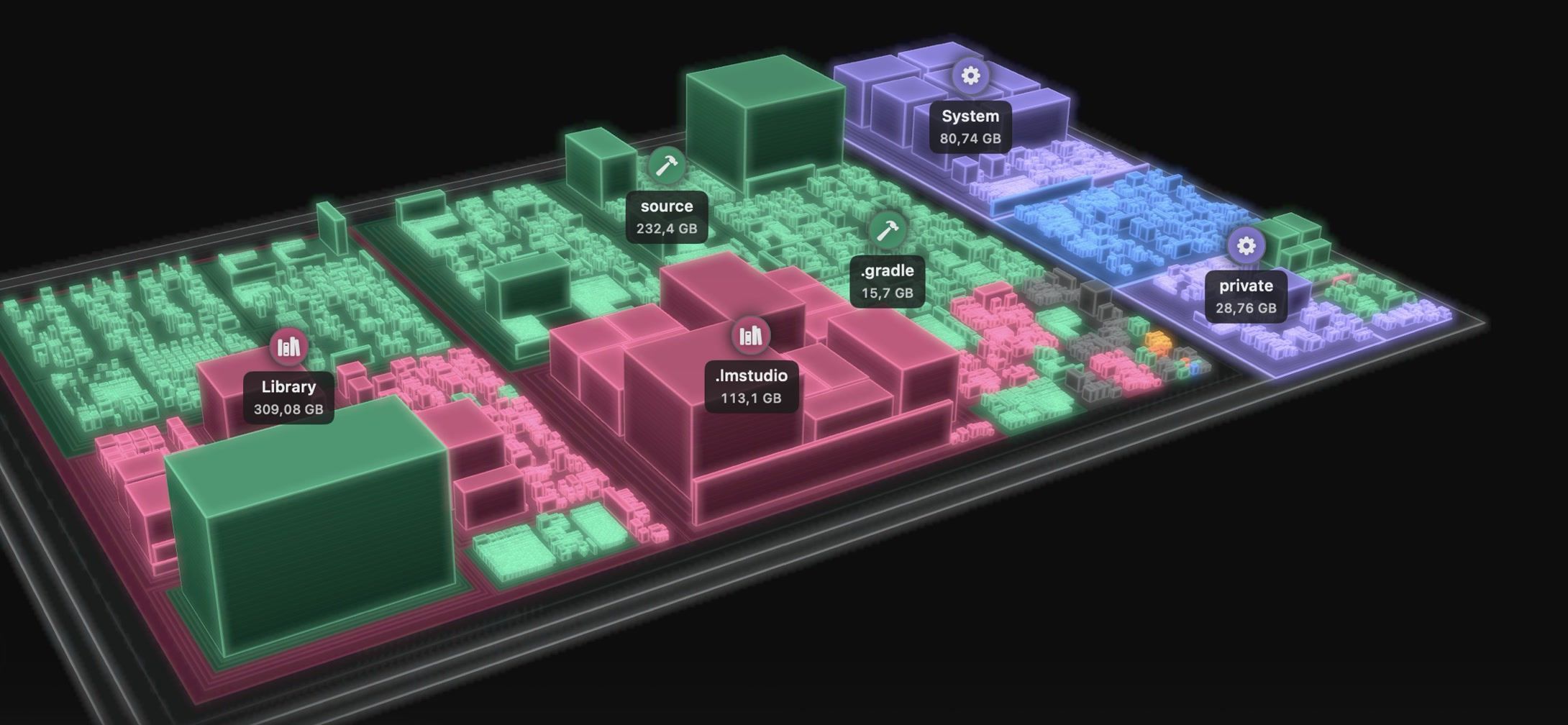
SPACE256 maps a Mac's disk as a 3D city, one building per folder, colored by kind

Map complete

SPACE256, the disk space map for Mac.See what fills your Mac. Clear it safely.

Join the waitlistmacOS 26Apple Silicon

Used
910.58 GB
Files
8,391,701
System Data
194.6 GB
Reclaimable
17.28 GB

One real Mac

Map

Every folder is a building.

Bigger folder, taller building.

Largest

113.1 GB

The biggest thing on this Mac.

Downloaded AI models, in one folder. Found by the map, not by guessing.

Developers

Dev junk, measured.

Developer data
293.95 GB
Safe to clean
35.87 GB
Tools found
7
What it finds →
System Data

194.6 GB

System Data, opened up.

Split into parts you recognize, each with the app it belongs to.

Safety

Nothing disappears.

  1. Scan
  2. You review
  3. Trash
  4. Put back
  • Low riskXcode DerivedDataPreselected
  • ReviewDocker disk imageYou decide
  • ProtectedXcode ArchivesNever touched
Privacy

Locked until you say so.

  • No account
  • Your files stay on your Mac
  • AI runs on your Mac
Waitlist

Be first on the map.

One email when SPACE256 launches. Nothing else.

FAQ

Frequently asked questions

Can SPACE256 delete something I need?

Nothing is deleted directly. Every cleanup goes through Review, where you see each item, and then moves to the Trash, so you can put it back. Only low-risk items that tools rebuild on their own are preselected; protected folders are never offered.

What is System Data, and why is it so big?

System Data is everything macOS can't put in another bucket: caches, local snapshots, virtual machine disks, app data. SPACE256 reads it, splits it into parts you recognize and tells you which app each part belongs to.

Does it need Full Disk Access?

It maps most of your disk without it. Some places, like Mail, Messages, Safari and the Trash, stay locked until you grant Full Disk Access in System Settings; SPACE256 shows them as locked zones instead of guessing.

Does anything leave my Mac?

Your files and folder names never do. There is no account and no usage tracking, and the AI features run on your Mac with Apple's on-device model. The only connections are update checks, which you can turn off, license activation, and crash reports if you opt in, with paths and file names removed.

Which Macs does it run on?

Macs with Apple Silicon running macOS 26 or later.